如题,笔者在想这个标题的时候思考了很久,不知道应该取一个什么样的标题才能涵盖全本篇要涉及的内容。绞尽脑子,最终确定起这个不痛不痒的标题。原因是,写这篇文章之前的一系列相关疑惑就是从View.post()开始的。
本篇要探究这么几个问题:
1、都知道非静态内部类和匿名类会引发内存泄露,并且我们也知道如何取避免这个问题的发生,但是怎样做得更加完美呢?
2、View.Post()中的run方法和Handler.post()方法中的run方法运行线程有什么不同呢?
3、View.Post()中的run方法在整个Activity的生命周期的里处在哪个位置呢?
好,以上三个问题就是我要总结的重点了。注意,下面对post方法将做的总结,对于postDelay同样适用。
1 问题一的情况
这个问题前面说过我们知道如何去避免它的发生,避免的方法可参考这篇文章。但是,对于真正的生产环境,这些还是不够的。所引文章中所提虽然避免了 Activity 泄漏,不过 Looper 线程的消息队列中还是可能会有待处理的消息,所以我们在 Activity 的 Destroy 时或者 Stop 时应该移除消息队列MessageQueue 中的消息。下面几个方法都可以移除 Message:
1 | public final void removeCallbacks(Runnable r); |
以上讨论的内容虽未提及View.post()系列,但是对于View.post()系列同样存在内存泄露的问题,我们可以用同样的方式避免,但是之后我们依然要记住removeCallbacks()噢。
2 问题二的情况
请允许我直接从Stack Overflow粘过来吧(别打我😜)
According to the documentation of Handler.postDelayed(Runnable r, long delayMillis):
Causes the Runnable r to be added to the message queue, to be run after the specified amount of time elapses. The runnable will be run on the thread to which this handler is attached.
On the other hand View.postDelayed(Runnable action, long delayMillis):
Causes the Runnable to be added to the message queue, to be run after the specified amount of time elapses. The runnable will be run on the user interface thread.
3 问题三的情况
探究这个问题主要是为了以后在post(new Runnable(){……})的run方法中写逻辑时,可以清晰的知道它在Activity的生命周期中所处的位置(这是很必要的,比如AnimationDrawable的start()方法只能在onStart()中或者之后执行才有效)。为了验证,我们直接上代码吧:
1 | @Override |
代码很简单,这里不多解释了,直接看运行结果吧:
1 | onStart |
结论很明显了,此时的run方法处在onAttachedToWindow方法之后。题外话,对于onAttachedToWindow方法Google的解释是下面这样的:
This is called when the view is attached to a window. At this point it has a Surface and will start drawing. Note that this function is guaranteed to be called before onDraw(android.graphics.Canvas), however it may be called any time before the first onDraw – including before or after onMeasure(int, int).
If you override this method you must call through to the superclass implementation.
大概意思是onAttachedToWindow可以保证在首个ondraw方法调用前被调用。因此,我们可以很放心地将一些绘制之前的初始化操作放在onAttachedToWindow里面。
4 问题延伸
4.1 Context的应用场景
对于Application,Service,Activity三者的Context的应用场景是怎样的呢?直接盗用一张图吧:
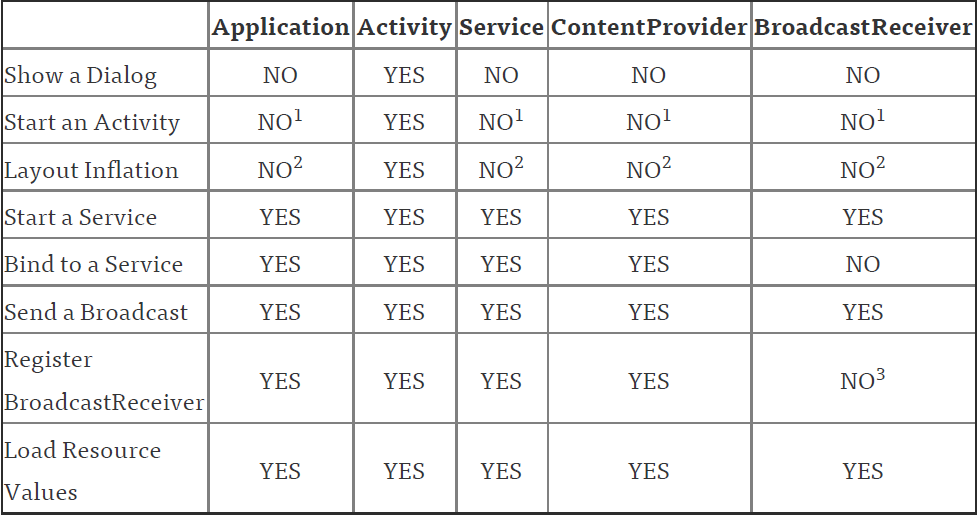
大家注意看到有一些 NO 上添加了一些数字,其实这些从能力上来说是 YES ,但是为什么说是 NO 呢?下面逐个解释一下:
数字1:启动 Activity 在这些类中是可以的,但是需要创建一个新的 task (此类场景测试过程中,笔者发现 SDK 已自动为 Intent 加上了 FLAG_ACTIVITY_NEW_TASK 标签,不需要手动添加)。一般情况不推荐。
数字2:在这些类中去layout inflate是合法的,但是会使用系统默认的主题样式,如果你自定义了某些样式可能不会被使用。
数字3:在 receiver 为 null 时允许,在 4.2 或以上的版本中,用于获取黏性广播的当前值。(可以无视)
注:ContentProvider、BroadcastReceiver之所以在上述表格中,是因为在其内部方法中都有一个 context 用于使用。
参考链接>>